
GPS data
Bring GPS from any brand into one place: 23 external-load metrics, same names.
get a live demo


What does it do?
The staff uploads the Excel or CSV from any GPS vest (WIMU, Catapult, STATSports, GPEXE…) and the system maps each brand’s own columns into one single shared vocabulary. It helps your staff:
- Import any brand’s Excel or CSV
- Map each brand’s columns by itself
- Compare each player with the team average
- Track the team’s trend session by session, per match
- Share a PDF per metric and player with your logo
The less time you spend fighting the file formats, the more time you have to read what the GPS data says.
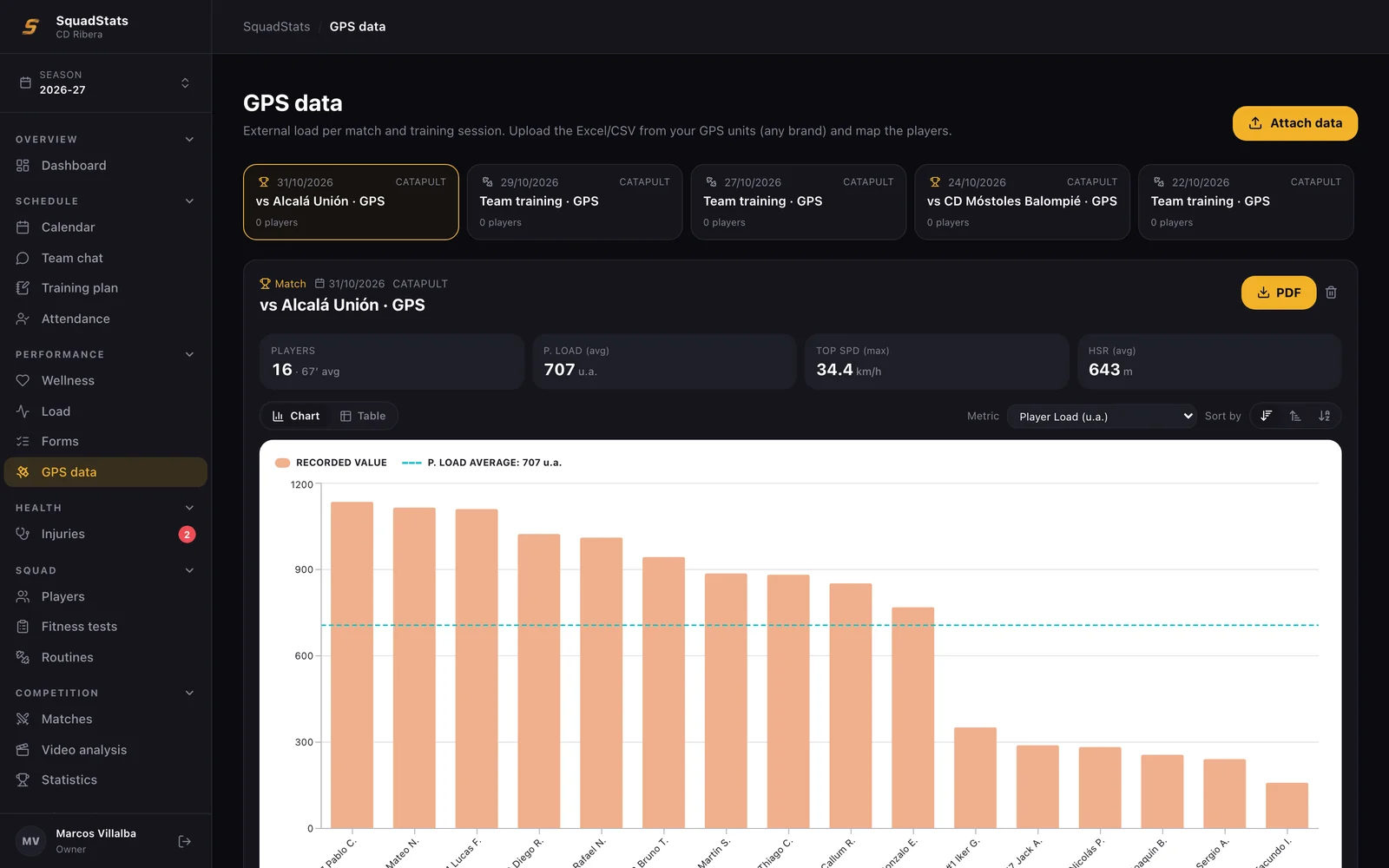
How GPS Sits Next to Your Load
GPS provides the objective external load and sits next to wellness, sRPE and the ACWR, but it does not move the ACWR, which is based fully on the internal load. It is presented as description and comparison, never as an injury predictor or as any danger traffic light.
Normalise
A brand-agnostic parser puts 23 metrics under one shared name: volume (total distance, high-speed running, sprint distance), intensity (distance per minute), speed (top speed, sprints), accelerations and decelerations, load (player load, metabolic power), contacts and heart rate. Units are all converted on their own, decimal comma too.
Matchday
Every match is shown player by player, with distance, sprints, top speed and player load, filters for the full match, excluding the warm-up or by period, and the team’s session-by-session trend. The three star KPIs are distance per minute, player load and the top speed in each match.
The column mapping is learned: the staff’s alias memory comes first, then an exact match against the catalogue, then a fuzzy suggestion that the staff then confirms. And the report it generates is a PDF per metric and player against the team average, with your branding, ready to share with all the coaches.
GPS describes and compares; there is no “danger” traffic light here, as there is for the internal load, and it never moves the player’s ACWR.
What changes for you
Every GPS brand exports its own file with its own column names, so most staff end up rebuilding the same spreadsheet after every match. GPS data reads the Excel or CSV from any vest, maps it to 23 metrics under one shared name and shows the match player by player, with the team average, personal bests and the session-by-session trend, plus a PDF report for each metric. Book a demo and send us a recent GPS file.
Other tools

BOOK DEMO TODAY
WE ONBOARD YOUR STAFF
Request a demo and our team will set up SquadStats with your real squad: temporary access, hands-on onboarding, and a proposal built for your club.


